
Failing a coding challenge rarely comes down to not knowing enough. Most candidates who get rejected actually understand the concepts. What trips them up is process: no clear structure, skipping edge cases, or freezing under pressure without a plan. If you’ve walked out of a technical interview knowing you could have done better, this guide is for you. We’ll walk through a systematic approach covering preparation, execution, and validation so you can stop leaving points on the table and start converting coding challenges into job offers.
Table of Contents
- Understand the challenge format and expectations
- Preparation essentials: Before you start coding
- Structured approach: How to tackle any coding problem
- Checking your work: Debugging and validation
- What most coding challenge guides miss (and why it matters)
- How MeetAssist can level up your interview readiness
- Frequently asked questions
Key Takeaways
| Point | Details |
|---|---|
| Know the challenge format | Understanding the expectations and types of questions helps focus your strategy. |
| Prepare with purpose | Strategic, timed practice and learning to clarify questions are essential for success. |
| Follow a repeatable framework | Using a structured approach makes even the toughest problems manageable. |
| Test and explain | Validating your solution and clearly communicating your thought process set you apart. |
Understand the challenge format and expectations
Before you can perform well, you need to know what you’re walking into. Coding challenges differ across companies, but most assess problem-solving, code quality, and communication. Understanding the format removes a huge layer of anxiety.
There are three main types you’ll encounter:
- Online asynchronous tests: You receive a link, log in, and solve problems on your own time within a deadline. Platforms like HackerRank and CodeSignal are common here.
- Live coding sessions: A recruiter or engineer watches you code in real time via screen share. Communication matters just as much as your code.
- Whiteboard challenges: Common in on-site interviews. You write code by hand or on a digital whiteboard, with no IDE to catch your mistakes.
Each format tests slightly different skills, but all of them share a core set of expectations. Here’s a quick breakdown of what technical interview types typically evaluate:
| Skill area | What interviewers look for |
|---|---|
| Logic and reasoning | Can you break down a problem into smaller steps? |
| Code quality | Is your code clean, readable, and efficient? |
| Edge case handling | Do you think beyond the happy path? |
| Communication | Can you explain your decisions out loud? |
| Testing awareness | Do you verify your solution before declaring it done? |
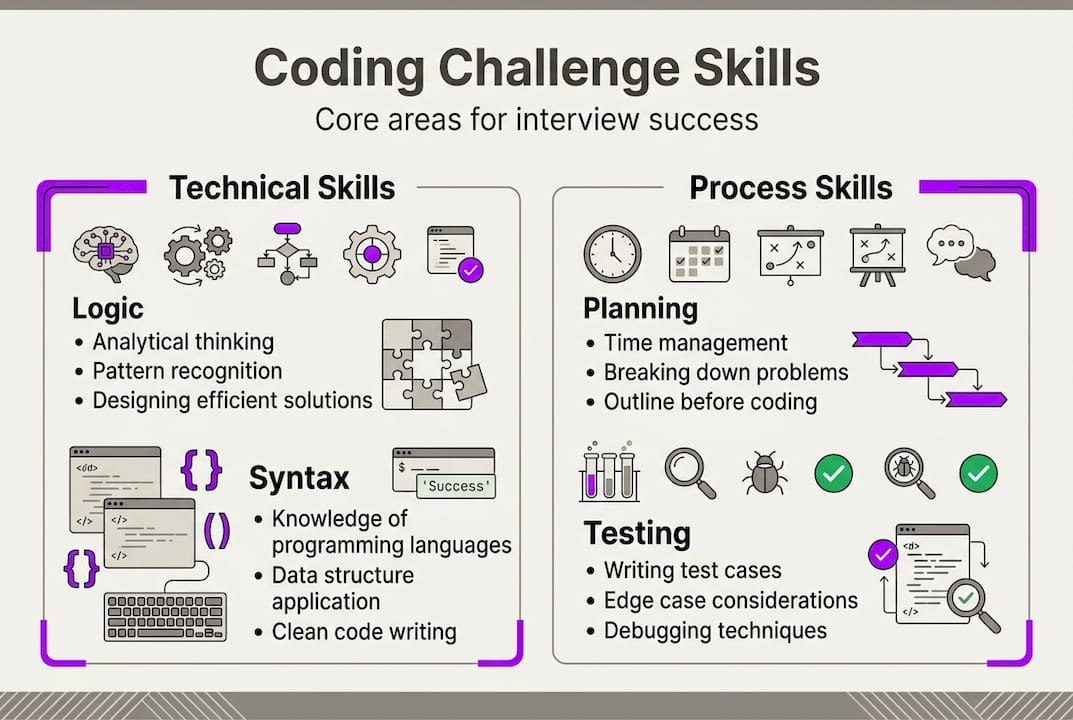
Here’s a number worth remembering: up to 70% of rejections in technical interviews come from process errors, not from missing knowledge. That means most people who fail already knew enough to pass. They just didn’t demonstrate it effectively. Interviewers aren’t only grading your final answer. They’re watching how you think, how you handle uncertainty, and whether you’d be pleasant to work with on a real engineering team.
Preparation essentials: Before you start coding
Step-by-step preparation measurably improves your interview performance. Yet most candidates skip structured prep and jump straight into grinding random problems. That’s like training for a marathon by running sprints with no schedule.
Start with a pre-challenge checklist you run through before every session:
- Read the problem statement at least twice before writing a single line of code
- Identify inputs, outputs, and any constraints mentioned
- Sketch out two or three example inputs by hand, including at least one edge case
- Ask yourself: what happens with empty input, zero, negative numbers, or very large data?
- Decide on your approach before you open a code editor
For preparing for technical interviews, the platform you practice on also matters. Here’s a comparison of the most popular options:
| Platform | Best for | Key feature |
|---|---|---|
| LeetCode | Algorithm-heavy interviews | Huge problem library, company-specific sets |
| HackerRank | Structured skill tracks | Certifications, timed challenges |
| CodeSignal | Pre-employment screening | Realistic test simulations |
| Exercism | Clean code habits | Mentor feedback on solutions |
Two common mistakes derail even well-prepared candidates. First, skipping edge cases during practice. If you only test your code against the obvious examples, you’ll be blindsided when an interviewer asks “what if the list is empty?” Second, poor time management. Many candidates spend 80% of their time on one problem and rush the rest.
Pro Tip: Set a timer during every practice session. Give yourself 30 minutes per problem and stop when it goes off, even if you’re not done. This trains your brain to work under real interview pressure, not just comfortable conditions.
Structured approach: How to tackle any coding problem
With your preparation dialed in, use this framework to confidently address any coding problem, from FizzBuzz to dynamic programming. Structure isn’t a crutch. It’s what separates candidates who look sharp from those who look scattered.
Following a clear process boosts interview answer ratings by 35%. Here’s the five-step framework you should internalize:
- Clarify: Before writing anything, ask questions. Confirm input types, output format, and constraints. Even if the problem seems obvious, clarifying shows maturity.
- Plan: Describe your approach out loud or in comments. Mention the data structure you’ll use and why. Talk through time and space complexity at a high level.
- Code: Write clean, readable code. Use meaningful variable names. Don’t try to be clever. Readable beats clever every time in an interview setting.
- Test: Run through your examples manually. Trace the execution line by line. Check your edge cases before you say you’re done.
- Communicate: Throughout all of the above, narrate your thinking. Interviewers want to hear your reasoning, not just watch your fingers move.
These steps for coding interviews are well established, but most candidates skip step one and rush step four. The candidates who stand out treat the framework as non-negotiable, not optional.

Pro Tip: When you’re stuck, narrate the problem out loud. Say “I’m thinking about using a hash map here because lookup is O(1), but I want to check if that handles duplicates.” This kind of interview answer strategy keeps the interviewer engaged and often triggers helpful hints from them.
Frameworks also help under pressure. When anxiety spikes, your brain defaults to familiar patterns. If your pattern is “clarify, plan, code, test, communicate,” you’ll stay grounded even when the problem feels unfamiliar. That’s not a small thing.
Checking your work: Debugging and validation
Solving a problem is just the beginning. Success hinges on how well you check and defend your solution in the interview setting. Rushing through testing is one of the most common ways strong candidates lose points right at the finish line.
Here are the best practices for debugging in interviews and validating your solution effectively:
- Test with your own examples first: Don’t rely only on the examples given in the problem. Create your own, especially edge cases like empty arrays, single elements, or maximum input sizes.
- Trace execution manually: Walk through your code line by line with a specific input. Write down variable values as they change. This catches off-by-one errors and logic gaps that look fine at a glance.
- Check for silent failures: Does your function return the wrong type? Does it handle null or undefined inputs? These are easy to miss and easy for interviewers to spot.
- Quick refactor if time allows: After testing, look for any obvious improvements. Rename a confusing variable. Remove a redundant loop. Small improvements signal professionalism.
“The best candidates explain their process while checking code, not just the final answer.”
This is what separates a good submission from a great one. When you verbalize your debugging tips and testing logic, you give the interviewer a window into your engineering mindset. They can see that you think about correctness, not just completion.
A common trap is treating testing as optional when time is running short. Don’t. A partially tested solution with clear reasoning about what you’d check next scores better than a rushed, untested one. Interviewers know time is limited. What they’re evaluating is your judgment about how to use it.
What most coding challenge guides miss (and why it matters)
Here’s what the standard advice leaves out: the candidates who consistently perform well in coding interviews aren’t just better at algorithms. They’re better at handling ambiguity. Real engineering work is full of incomplete specs, shifting requirements, and trade-offs with no clean answer. Interviewers know this, and the best ones design questions to surface exactly that skill.
When you get a problem that feels underspecified, that’s not an accident. It’s a test of whether you’ll ask smart questions or make silent assumptions. Candidates who say “I’m going to assume X, but in a production setting I’d confirm this with the team” show tech interview soft skills that algorithms alone can’t demonstrate.
The other thing most guides skip is the value of communicating trade-offs. Saying “my current solution is O(n²) but I could improve it to O(n log n) with a different data structure if performance is critical” is worth more than silently writing the faster version. It proves you understand the decision, not just the code.
Approach every challenge as a chance to show how you think, not just what you know. That mindset shift changes everything.
How MeetAssist can level up your interview readiness
You’ve seen the strategies. Now discover a tool designed to make this process smoother and more effective.

MeetAssist is a Chrome extension that provides real-time AI assistance during technical interviews and coding assessments. It integrates with Google Meet, Microsoft Teams, and other web-based platforms, generating AI-powered suggestions as you work through problems. With Phone Mode, you can use AI in Google Meet interviews with nothing visible on your screen, keeping everything discreet. MeetAssist also lets you remotely capture and analyze any active Chrome tab from your phone, including live coding challenges. If you’re evaluating your options, compare leading AI interview assistants to see how MeetAssist stacks up. No subscriptions, just one-time access.
Frequently asked questions
How much time should I spend on each coding challenge during an interview?
Aim to spend no more than 25 to 40 minutes per challenge, reserving time to test and explain your solution. Time management directly impacts your interview score, so practice with a timer during prep.
What should I do if I get stuck on a coding challenge?
Verbalize your thought process, outline your assumptions, and ask clarifying questions to show your approach even if you don’t finish the problem. Communicating clearly can earn you significant credit even on an incomplete solution.
How important is code optimization compared to having a working solution?
A correct working solution always comes first. If time allows, explain how you’d optimize or refactor for efficiency rather than silently rewriting. Interviewers value candidates who show awareness of optimization trade-offs, even if the optimized version isn’t fully coded.
What is the best way to practice for coding challenges?
Simulate timed sessions on platforms like LeetCode and validate your solutions against real company examples. Using mock interviews and realistic test conditions builds the kind of readiness that transfers directly to the actual interview.
Recommended
- Step by Step Interview Preparation for Coding Success – MeetAssist | MeetAssist
- Resume-based answers boost 40% interview success rate – MeetAssist | MeetAssist
- Master the interview response process: step-by-step guide | MeetAssist
- Master types of technical interviews for job success | MeetAssist
- Master interview question answers with confidence | Pavone Academy
Looking for help with your next interview? MeetAssist provides real-time AI assistance during your video interviews on Google Meet, Zoom, and Teams. Browse our interview preparation guides to get started.