
You’ve done the work, built the skills, and landed the interview. Then the question hits, and your mind goes blank. It’s one of the most frustrating experiences a job seeker can face: knowing you’re qualified but struggling to show it under pressure. Remote interviews add another layer of complexity, from tech glitches to the awkward silence of a video call. The good news is that a structured interview response process, combined with the right preparation tools, can turn that anxiety into confidence. The STAR method (Situation, Task, Action, Result) is the primary framework for behavioral responses, and it’s just the starting point.
Table of Contents
- Understanding the interview response process
- Preparation: Tools, environment, and requirements
- Step-by-step: Responding to behavioral questions
- Step-by-step: Responding to technical questions
- Leveraging AI tools and mocks for interview readiness
- Next steps: Tools to boost your interview response process
- Frequently asked questions
Key Takeaways
| Point | Details |
|---|---|
| Structure wins | Using proven methods like STAR makes your responses clear, confident, and predictive. |
| Practice matters | Mock interviews and repeat preparation dramatically reduce errors and increase success rates. |
| Tech readiness | Testing your equipment and setup avoids preventable mistakes during remote interviews. |
| Balance AI | AI tools help, but authentic reasoning and self-practice ensure long-term job performance. |
Understanding the interview response process
Every strong interview answer shares one thing: structure. Without it, even brilliant candidates ramble, lose the interviewer’s attention, or undersell their actual impact. Two frameworks dominate modern interview prep, and knowing both gives you a serious edge.
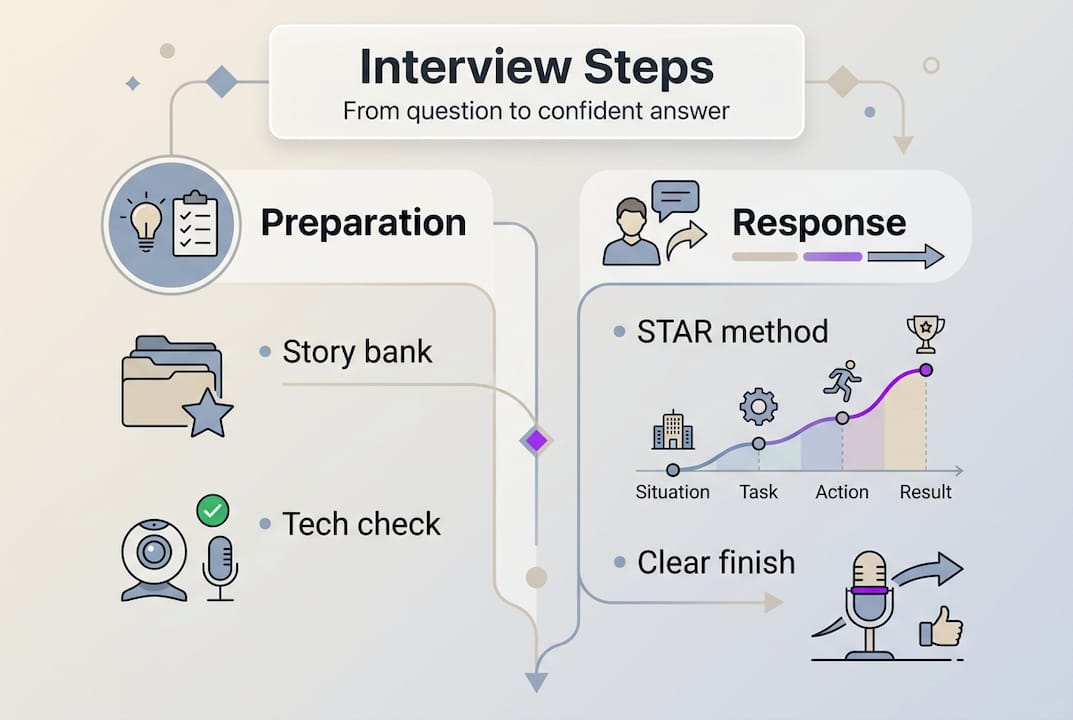
For behavioral questions, the STAR method is the gold standard. You describe the Situation you faced, the Task you were responsible for, the Action you took, and the Result you achieved. Structured methodologies like STAR increase candidate preparedness and predict performance far better than unstructured answers. Interviewers are trained to spot vague, story-less responses, and STAR keeps you focused and credible.
For technical questions, the think-aloud approach is your equivalent framework. Instead of going silent while you solve a problem, you narrate your reasoning out loud. This shows the interviewer how you think, not just what you produce. It also buys you time and helps you catch your own errors before they become visible mistakes.
Unstructured responses, by contrast, tend to meander. Candidates jump between points, forget to quantify outcomes, or accidentally use “we” when the interviewer wants to know what you specifically did. These habits quietly signal a lack of preparation, even when the underlying experience is strong.
“The best interview answers aren’t improvised. They’re rehearsed enough to sound natural but structured enough to land.”
Here’s what a solid behavioral prep library looks like:
- 6 to 10 flexible stories drawn from real work experience
- Each story adaptable to multiple question types (leadership, conflict, failure, success)
- Quantified results wherever possible (percentages, timelines, revenue impact)
- Clear “I” statements that highlight your personal contribution
- Stories that show growth, not just achievement
Pro Tip: Build your story bank before you start applying. Trying to invent examples on the fly during an interview is where most candidates lose points on behavioral interview tips they already know.
Now that we understand the importance of structure, let’s clarify what you need before the interview.
Preparation: Tools, environment, and requirements
A great answer delivered through a choppy microphone or a cluttered background loses impact fast. Remote interview success is 50% what you say and 50% how it comes across technically and visually. Remote interviews require tested tech and a professional environment before you ever join the call.
Here’s a quick-reference checklist for your setup:
| Category | What to check | Why it matters |
|---|---|---|
| Hardware | Camera, microphone, headset | Clear audio and video signal |
| Internet | Wired connection preferred | Prevents lag and dropped calls |
| Software | Zoom, Teams, or platform tested | Avoids login or permission errors |
| Environment | Neutral background, good lighting | Projects professionalism |
| Backup | Phone hotspot, second device | Handles unexpected failures |
Beyond the checklist, your environment sends a signal. A ring light or a well-lit window in front of you (not behind) makes a noticeable difference. A plain wall or a tidy bookshelf beats a messy room every time. These details aren’t vanity; they affect how seriously you’re perceived.

For platform-specific prep, the remote technical interview process often includes screen sharing, live coding environments, or whiteboard tools. Practice sharing your screen before the interview so you’re not fumbling with permissions mid-session.
Pro Tip: Run a full mock session at least one day before the interview. Test every tool, check your lighting at the same time of day as your scheduled interview, and confirm your internet speed. Surprises on interview day are almost always avoidable. For more setup guidance, check out these remote interview tips that cover platform-specific scenarios.
Once you’re set up with the right environment and tech, it’s time to tackle the process step-by-step.
Step-by-step: Responding to behavioral questions
Behavioral questions follow a predictable pattern: “Tell me about a time when…” or “Give me an example of…” The interviewer wants evidence, not theory. Here’s how to build an answer that delivers.
- Identify the situation. Set the scene briefly. One or two sentences max. Give enough context for the interviewer to understand the stakes without turning it into a backstory.
- Define your task. What were you specifically responsible for? This is where you separate your role from the team’s role.
- Describe your action. This is the core of your answer. Be specific about what you did, the decisions you made, and why. Avoid passive language.
- State the result. Quantify it. “The project launched on time” is weaker than “We cut delivery time by 30% and the client renewed their contract.”
- Tie it back. In one sentence, connect the outcome to the skill the interviewer was probing.
Timing matters. Keep behavioral answers between 90 seconds and 2.5 minutes. Shorter feels underprepared; longer loses the room. STAR users are perceived as 40% more prepared and behavioral interviews predict 55% of future job performance, which means your answer structure directly affects hiring decisions.
Here’s how STAR compares to an unstructured response:
| Response type | Clarity | Perceived preparation | Quantified outcome | Interviewer engagement |
|---|---|---|---|---|
| STAR method | High | Strong | Usually yes | Sustained |
| Unstructured | Low to medium | Weak | Rarely | Drops off quickly |
For more depth on behavioral question strategies, including how to handle tricky questions about failure or conflict, it helps to review examples before your session.
Pro Tip: Prepare three to four stories that can flex across different question types. A story about a tight deadline can answer questions about pressure, prioritization, and teamwork. One good story, told well, covers a lot of ground.
Behavioral answers set the tone. Next, let’s apply a structured approach for technical interviews.
Step-by-step: Responding to technical questions
Technical interviews test more than your coding ability. They test how you think, communicate, and handle uncertainty. Interviewers often care as much about your process as your final answer.
Here’s the step-by-step approach that works:
- Restate the problem. Repeat it back in your own words. This confirms you understood it and gives you a moment to think.
- Clarify constraints. Ask about input size, edge cases, time complexity expectations, or any ambiguities. Never assume.
- Propose your approach. Before writing a single line of code, explain your plan. A brute-force solution stated clearly beats a clever solution explained poorly.
- Write the code. Work through it methodically. Narrate as you go.
- Test with examples. Walk through your code with a sample input. Catch bugs before the interviewer does.
- Handle edge cases. Empty inputs, null values, very large numbers. These are where most solutions break.
- Optimize if asked. Discuss time and space complexity. Suggest improvements even if you don’t implement them.
Technical interview success requires all of these steps, not just the coding part. Skipping clarification is the most common mistake. Candidates dive into code, solve the wrong problem, and lose valuable time.
Common pitfalls to avoid:
- Going silent for long stretches without narrating your thinking
- Skipping edge cases because the base case works
- Changing your approach mid-solution without explaining why
- Forgetting to check for off-by-one errors in loops
- Rushing to optimize before getting a working solution first
“A working solution explained clearly beats an optimal solution explained poorly. Get it working, then make it better.”
For candidates preparing for technical interview automation platforms, the same principles apply. Many automated systems score your verbal reasoning alongside your code output.
Pro Tip: Always verbalize your reasoning, even when you’re confident. Silence reads as confusion to an interviewer. Narrating your logic also helps you catch your own mistakes before they become visible errors.
Having practiced both behavioral and technical answers, let’s see how modern tools and AI can elevate your responses.
Leveraging AI tools and mocks for interview readiness
AI has changed how candidates prepare. The question isn’t whether to use it; it’s how to use it well. There’s a meaningful difference between using AI to build skills and using it as a crutch that leaves you helpless without it.
Practice mocks are essential, and some platforms like GitLab allow AI use during assessments but emphasize reviewing async materials first. The pattern is consistent: AI works best as a feedback layer, not a replacement for your own thinking.
Here’s how to use AI tools effectively in your prep:
- Mock interviews: Use AI to simulate questions and get structured feedback on your STAR answers
- Answer review: Paste your draft answers and ask for gaps in logic, missing quantification, or weak transitions
- Edge case generation: Ask AI to suggest edge cases you might have missed for a coding problem
- Tone check: Review whether your answers sound confident and specific, not vague or passive
- Resume alignment: Match your stories to the job description to ensure relevance
Structured responses reduce bias in how interviewers evaluate candidates, but over-reliance on AI may hinder long-term skill building. The goal is to internalize the frameworks so you can execute them under pressure, without needing a prompt.
For a broader look at AI interview tools and ethics, including what’s considered fair use and what crosses a line, it’s worth understanding the landscape before your next interview. You can also explore how to use AI for interviews in ways that build your confidence rather than replace it.
Pro Tip: Use AI to sharpen your answers during prep, but always run at least two full mock sessions completely unaided. That’s the only way to know if the structure is actually yours.
With these strategies, you can adapt and verify your responses before the big day. Next, let’s connect you to tools that simplify the process.
Next steps: Tools to boost your interview response process
Preparing with frameworks is powerful. Having real-time support during the actual interview takes it further. MeetAssist is a Chrome extension that listens to your interview in real time and surfaces AI-powered answer suggestions as questions come in, whether you’re on Google Meet, Microsoft Teams, or another web-based platform.

For candidates who want zero visibility on screen, Phone Mode moves everything to your phone after a quick QR scan. Transcripts, suggestions, and even live analysis of your coding challenge tab appear on your phone only. Nothing shows on your computer. You can explore the full setup in the MeetAssist usage guide, or compare options across the AI interview assistant alternatives page to find the right fit for your next interview.
Frequently asked questions
What is the STAR method for interview responses?
The STAR method is a framework for behavioral questions: describe the Situation, Task, Action, and Result to structure a clear, impactful answer. STAR improves preparation and predicts job performance better than unstructured responses.
How should I approach technical interview questions?
Restate the problem, clarify constraints, propose a solution, write the code, test with examples, and handle edge cases. Technical response success depends on narrating your reasoning throughout, not just producing a final answer.
How can I prepare for remote interviews?
Test your camera, microphone, and internet connection at least one day before. Remote interviews succeed when your tech is reliable and your environment looks professional, so treat setup as part of your preparation.
Can AI tools help me with interview responses?
Yes, AI is effective for mock practice, answer feedback, and edge case generation during prep. Over-reliance on AI can weaken your independent reasoning, so balance AI-assisted sessions with fully unaided practice runs.