
The undetectable
AI interview assistant
MeetAssist is an AI interview assistant that gives you real-time answers in live interviews on Zoom, Google Meet and Teams, invisible on screen share.
Free to start · No credit card
 Also as a Chrome extension (visible on screen share)
- users
- 10,000+
- users
- sessions
- 60,000+
- sessions
- transcribed lines
- 1.2M+
- transcribed lines
- languages
- 45
- languages
It listens. It understands. It answers.
Instant, Accurate Transcription
Both sides of the call, live in 45 languages. Tuned to your resume and the job post.
Context-Aware Answers
Remembers the conversation, understands follow-ups, and keeps answers consistent.
How our real-time AI interview assistant works. From setup to post-interview feedback.
Get started
Install MeetAssist
Download the app for Windows or macOS, or use the Chrome extension. Start for free.
During the interview
It listens to both sides
MeetAssist detects interview questions in real time on Zoom, Google Meet, Microsoft Teams and other platforms.
Get answers
Answers tailored to you
Instant AI-generated answers based on your resume and the job description, on your screen or phone.
After the interview
Review your interview
Get your transcript, the interview questions and personalized feedback to help you improve.
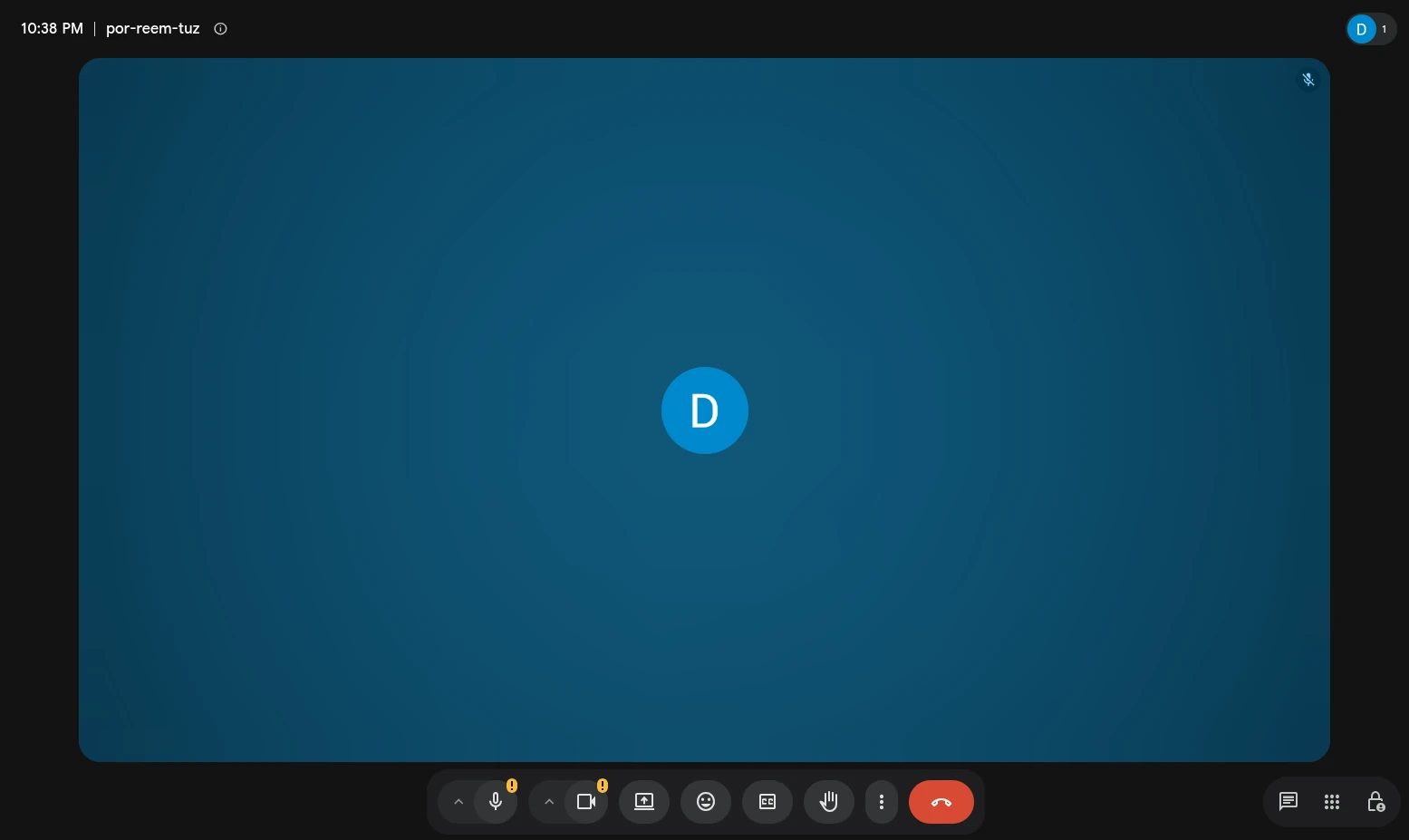
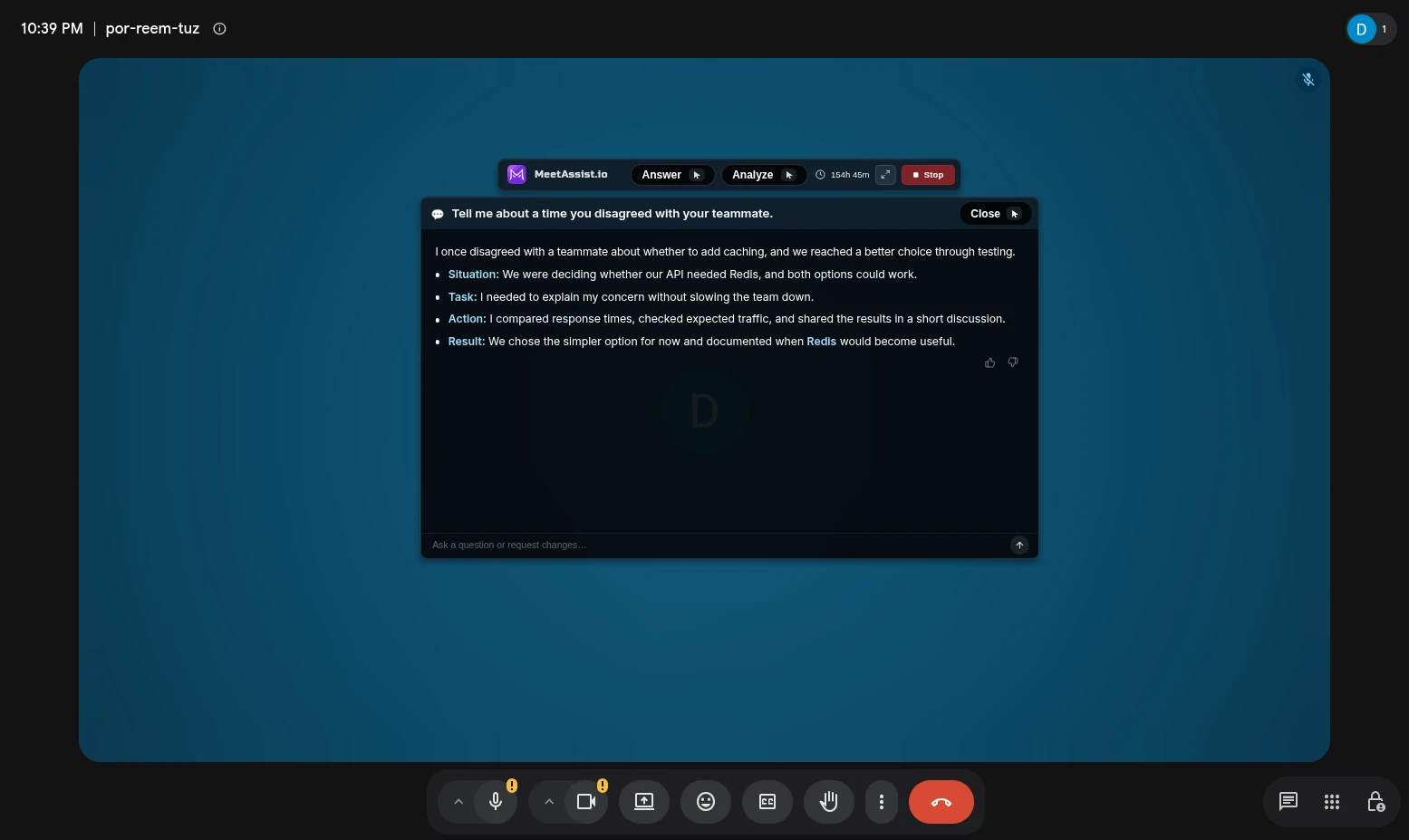
Invisible during screen sharing. MeetAssist is a stealth AI interview assistant: visible to you, not to your interviewer.
Screen share
Invisible on screen share
You see MeetAssist while you share your screen on Zoom, Google Meet, Microsoft Teams or Webex. Your interviewer doesn’t.
Recording
Hidden from screen recordings
Recordings of the call show a clean screen, without the MeetAssist window.
Dock & taskbar
No Dock or taskbar icon
The desktop app runs without an icon in the macOS Dock or the Windows taskbar.
Cursor
The cursor never changes
Over MeetAssist your cursor stays a plain arrow, so nothing on a shared screen gives it away.
Everything you need during an interview. Real-time AI answers, coding help, online assessments and a phone companion, all in one place.
Solve Coding Tasks
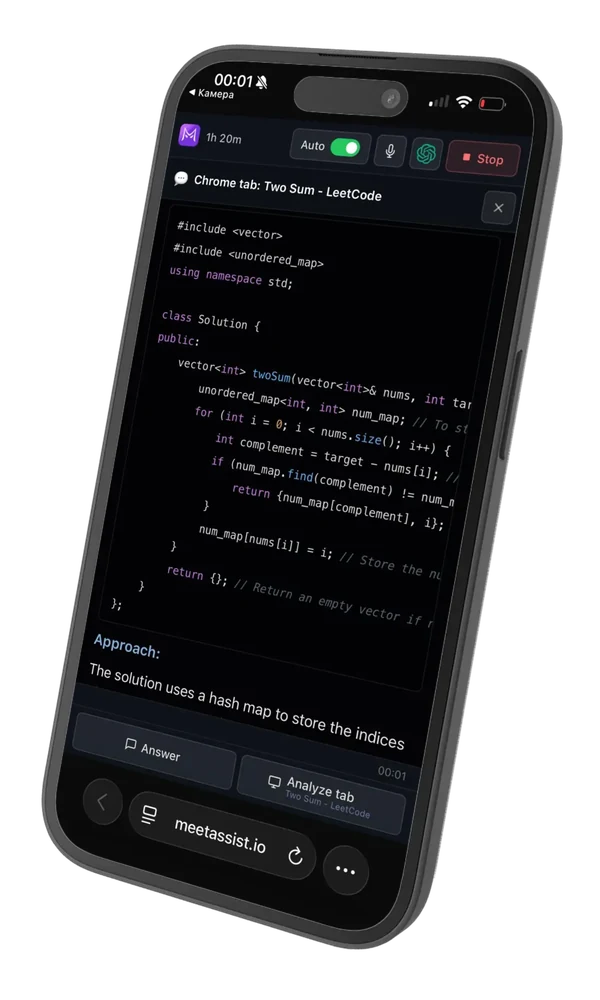
An AI coding interview assistant for LeetCode, HackerRank and CoderPad. It reads the task on your screen and suggests the code, an explanation and the time complexity, with talking points for system design questions too.
Solve Quizzes & Tests
Analyze multiple-choice questions and online assessments right from your screen, with a short explanation for each answer.
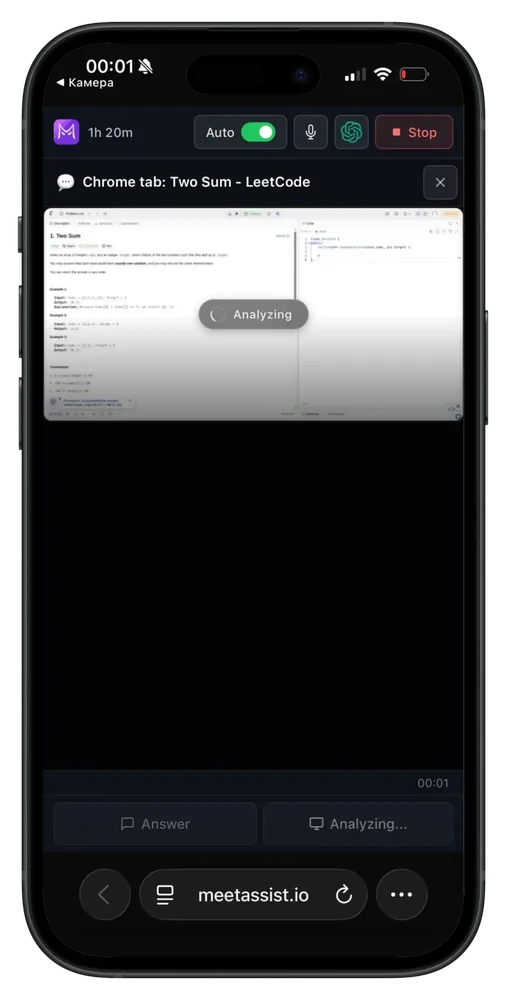
Continue on Your Phone
Phone Mode: scan a QR code to read AI-generated answers on your phone, without showing them on your computer.
Built on Your Experience
Personalized answers based on your resume, the job description and the stories in your Answer Bank.
What people say. Real interviews, in their own words.
4.125 ratings on the Chrome Web StoreI recently came across this app and have been really impressed with how well it works. It provides accurate answers and can be quite helpful, especially during interviews. The overall architecture seems well-designed, and if you use it smartly, you'll definitely get great value from it.
Narendra KotamahntiChrome Web Store · Apr 2026Very helpful AI interview tool. Clean, smart, and useful for real-time guidance during meetings and technical preparation.
לירן בלומנברגChrome Web Store · Jun 2026Refund is not necessary. It is still a good tool.
Coding stuff is usually pretty easy for me, but the theory questions can sometimes catch me off guard. So I kept MeetAssist open during one interview as a backup, and it instantly pulled up all the key terms from all the questions. Honestly, it really gave me a lot more confidence.
I really needed a discreet copilot to help me with practice behavioural interviews and technical panel sessions on Google Meet.Found some on chrome websote but none of them were that usefull. Than found this extension.It fits directly into my open video call window without having to include an intrusive bot as a participant in the meeting, Recommended add ons.
Bald StreakChrome Web Store · Oct 2026Really liked MeetAssist. Tried using it from my phone and it works almost the same as the desktop. All the same features are there. What I liked the most is the "Analyze" button on my phone, which is super useful. you can even use it for live coding which is kinda crazy.
Juliana PetrusChrome Web Store · Mar 2026On past interviews, I kept blanking out on metric questions just from pure stress. I searched around for help and found MeetAssist. … MeetAssist instantly popped a quick hint on my screen. I got the idea and answered it in my own words. Huge lifesaver.
I tested the extension with my own CV, and I liked that its suggestions were personalized instead of generic It matched my experience and skills to the interview questions, making the responses feel much more relevant the real time guidance during the mock interview was also smooth and easy to follow.
Kareem AbdelaleemChrome Web Store · Jul 2026I really, really liked it, it helps a lot in any type of interview. I used it myself to apply for a master’s abroad, and it answers any kind of question smartly and academically. You just need to set up the rules properly.
Great app btw. Will use this.
Reviews quoted word for word from the Chrome Web Store listing, where all 25 ratings are public. Support-chat messages are shown without names.
Built premium. Priced fairly.
One-time payments. No subscription, nothing renews.
Free Trial
No card required
- 20 minutes of live help
- All interview features
- No card, no subscription
180 Minutes
Perfect for a few interviews
No auto-renewal
- 180 interview minutes
- Minutes never expire
Unlimited Week
For a busy interview week
No auto-renewal
- Unlimited minutes
- Valid for 7 days
Unlimited Month
Best for an active job search
No auto-renewal
- Unlimited minutes
- Valid for 30 days
Secure payment · No hidden fees · Full refund if it doesn’t work for you
Works wherever you interview.
Desktop app, Chrome extension or your phone. The same answers, however you join the call.
Desktop app for Windows and Mac
The MeetAssist desktop app runs quietly next to your call. It hears your microphone and the interviewer through any call app, from Zoom and Microsoft Teams to Google Meet and Webex, and answers in real time. It stays hidden from screen sharing and recordings, with no icon in the Dock or taskbar.
Chrome extension
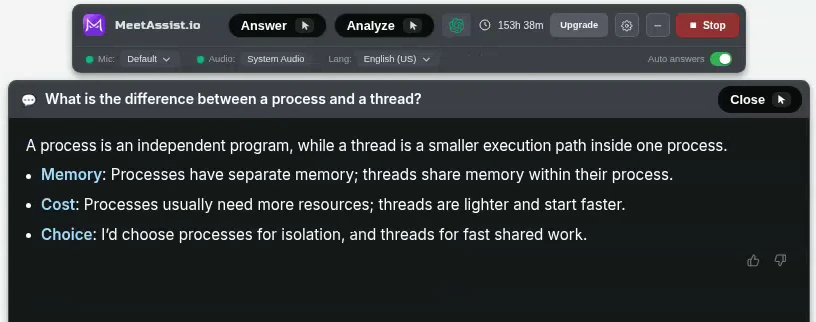
The AI interview assistant as a Chrome extension: use it right inside browser meetings on Google Meet, Zoom and Teams, with nothing to install outside Chrome. Visible if you share that tab or your whole screen.
Works on your phone
Scan a QR code from the desktop app or the extension and the answers appear on your phone. No app to download: it runs in the browser on iPhone and Android.
Step-by-step guides
Built for speed and reliability.
Every session runs on our own servers, premium speech recognition and the latest AI models, routed to the region closest to you.

US 35 ms · Europe 37 ms · India 69 ms
Median server response by region
3 server regions
Servers in the US, Europe and India. Your session runs in the closest one.
Global edge network
Every connection enters the nearest point of Cloudflare’s network.
Automatic failover
If a region goes down, traffic moves to the next one on its own.
Premium stack
Top-tier speech recognition and the latest Claude, GPT and Gemini models.
Questions before you start?
Everything important about setup, privacy, answers and billing.
An AI interview assistant, also called an AI interview helper or interview copilot, is an app that listens to a live interview, notices each question and shows you a suggested answer in real time, so you can answer in your own words with the key points in front of you.
MeetAssist is one: it hears both sides of the call, builds every answer on your resume (CV) and the job description, and stays hidden from screen sharing in the desktop app.
MeetAssist is an AI interview assistant, also called an interview copilot. It listens to both sides of the call, notices when the interviewer asks a question and shows you an answer built from your resume (CV) and the job description, live, while you talk.
It comes as a desktop app for Windows and macOS and as a Chrome extension, and works in Zoom, Google Meet, Microsoft Teams and other call apps.
You can start free: every new account gets 20 minutes of live help with all features, no card needed. In the Chrome extension the free minutes top back up to 20 once a day after you’ve used them.
When you need more, plans start at $9, as one-time payments with no subscription.
The desktop app, if you can. It stays hidden while you share your screen, hears every app on your computer (Zoom, Teams, Meet, any browser) and is faster and more reliable.
The Chrome extension works inside Chrome for browser meetings. It hears only your microphone and the meeting tab, and it is visible if you share the screen or tab it sits on. You don’t need both.
Yes. The desktop app listens to your microphone and your computer’s sound, so it works with any call app: Zoom, Google Meet, Microsoft Teams, Webex, Slack and others (in the app or in the browser), and with coding platforms like HackerRank, CoderPad and LeetCode.
The Chrome extension works with meetings opened in Chrome (Meet, Zoom and Teams on the web).
Any live interview, for any role and level: behavioral interviews (answers in the STAR method, built from the stories in your Answer Bank), technical questions and follow-ups, live coding on LeetCode, HackerRank or CoderPad, system design, SQL and data questions, product and case interviews, online assessments and salary questions.
It works in 45 languages, and the answers come in the language of the interview.
Desktop app: Windows 10 (version 2004 or later) or Windows 11, 64-bit, or macOS 13 Ventura or later, with one download for both Apple Silicon and Intel Macs. There is no Linux version yet.
Chrome extension: desktop Chrome 116 or later on Windows, Mac or Linux. Phone Mode: the browser on any iPhone or Android phone, no app to install.
Either way you need a microphone and internet during the interview.
Yes. On the setup screen, See how it works plays sample interview questions, so you see the answers appear before your real call. It uses minutes like a real session, and the free 20 minutes are enough to try it.
You can also start a session on a test call with a friend to check the audio and the answers end to end.
Yes, if the call runs on your computer: a phone or audio-only interview in Zoom, Teams, Google Meet, WhatsApp or any other app is just sound, and the desktop app hears it.
If the call is on your mobile phone, no: MeetAssist listens on your computer, not on your phone. Phone Mode only shows the answers on your phone.
Open MeetAssist before the call, add your resume (CV) and the job description, and press Start when the interview begins. It doesn’t start on its own.
With the Chrome extension, join the meeting in Chrome first, then open MeetAssist in that same tab.
On a Mac, allow Screen Recording (and System Audio Recording on macOS 14 and later) when asked. That’s how the app hears the interviewer. It doesn’t record your screen.
45 languages and regional variants, including English (US, UK, Australia, India), Spanish, French, German, Portuguese, Hindi, Japanese, Korean and Chinese. Pick the language the interview is in; answers come in the same language. It listens to one language at a time, and you can switch during the call.
Not with the desktop app. It runs in a layer that screen sharing and screen recording don’t capture, on both Windows and macOS. You see it, the people on the call don’t.
The Chrome extension is different: it is part of the page, so it shows up if you share that screen or tab. For screen-share interviews use the desktop app or Phone Mode.
On the call, nothing gives it away. MeetAssist never joins your call: there is no bot, no extra participant and no notification to anyone. The desktop app is hidden from screen sharing and recordings and has no icon in the Dock or taskbar.
Like any app, it does appear in Task Manager or Activity Monitor on your own computer, and proctoring software that inspects your computer can notice it.
No. Audio is streamed for live transcription and never stored. The transcript and answers are saved to your account so you can review the interview afterwards.
No. Auto answers detect the interviewer’s questions and answer on their own, in real time. Want an answer right now? Just move your mouse over Answer. No click, so nobody hears it. You can switch auto answers off at any time.
Add your resume (CV) and the job description (paste it, upload a file or import it from a link). Put your own stories and prepared answers in the Answer Bank (upload a PDF, Word or text file, or just type them), and MeetAssist uses them when a similar question comes up.
Then choose the format (key points, bullets or full answer), length and tone, turn on the STAR method for behavioral questions, or write your own answer instructions.
Yes. Hover over Analyze (or use the shortcut) and it reads what’s on your screen (a coding problem on LeetCode, HackerRank or CoderPad, a multiple-choice quiz, a diagram) and shows the approach, the code and the complexity. It also takes into account what was said on the call. In the desktop app you can choose which display it looks at.
Scan a QR code and the transcript and answers appear on your phone instead of your computer. No app to install and no login: it opens in your phone’s browser on iPhone and Android. Your computer still listens to the call; the phone shows the answers and lets you ask for one.
If the phone won’t connect, turn off VPN on the computer and the phone: both need to reach the same server.
The latest models from Google, OpenAI and Anthropic: Gemini, GPT and Claude. The free plan includes the base models; any paid plan unlocks all of them.
Yes. After a real interview (at least 10 minutes, with questions asked) you get a report by email: the questions, how you answered and how to answer better. Every session with a saved transcript is in your dashboard, where you can also download the transcript.
You can start free with 20 minutes. After that: $9 for 180 minutes, $19 for an unlimited week, or $29 for an unlimited month.
No. Every plan is a one-time payment. Nothing renews and you’re never charged again automatically. When you need more, you buy again.
Yes. If MeetAssist didn’t work for you, or you haven’t used what you bought, you get a full refund. Otherwise you can ask within 7 days as long as no interviews were processed. Just write to us.
Still have a question? Talk to us →
Use it where it’s welcome.
MeetAssist is made for practice, preparation, meetings and interviews where an AI assistant is fair game. If an employer, school or test platform doesn’t allow one, follow their rules.
Hiring team with a concern? support@meetassist.io
Walk into your next interview ready.
Free to start. 20 minutes, no card needed.
Or add the Chrome extension