
Interview screen invisibility represents a technological frontier in remote technical interviews that most candidates don’t fully understand. This technology enables AI assistance to appear only on your screen while remaining completely hidden from screen sharing, recordings, and interviewer view. As remote technical interviews become the norm, understanding how invisible overlay systems work, their real-world applications, and the ethical considerations surrounding them has become essential knowledge for job seekers navigating modern technical assessments. This guide breaks down the mechanics, tools, and practical implications of interview screen invisibility technology.
Table of Contents
- Key takeaways
- Understanding interview screen invisibility technology
- Key tools and real-world applications for technical interviews
- Ethical considerations, risks, and detection challenges
- Practical advice for job seekers using interview screen invisibility
- Explore safe AI interview assistance with MeetAssist
- Frequently asked questions about interview screen invisibility
Key Takeaways
| Point | Details |
|---|---|
| OS overlay APIs | The technique uses operating system compositor APIs to create overlays that the user sees but which are excluded from screen capture and recording. |
| Real time AI aid | Real time AI assistance appears on the candidate screen during technical interviews while remaining hidden from screen sharing and recordings. |
| Detection methods | Employers and interview platforms are developing detection and countermeasures to identify hidden overlays. |
| Ethical concerns | The same technology raises ethical questions and potential long term issues if misused. |
Understanding interview screen invisibility technology
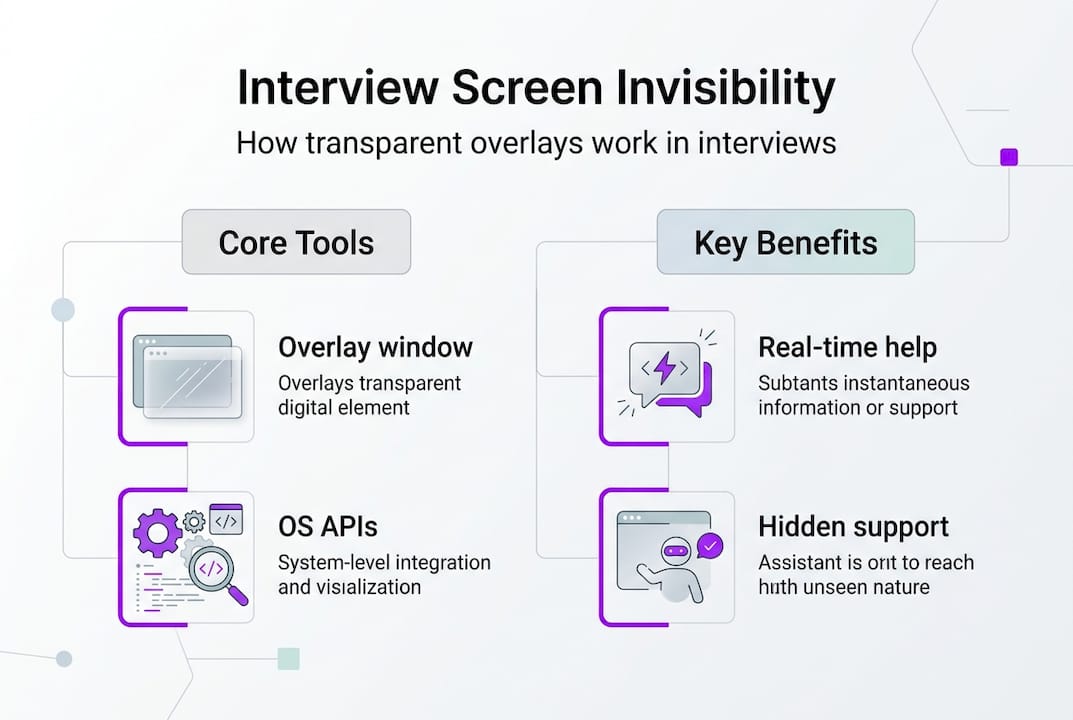
The core mechanism behind interview screen invisibility involves creating transparent, frameless, always-on-top windows that actively exclude themselves from screen capture or recording systems. Interview screen invisibility uses OS compositor APIs like Windows’ SetWindowDisplayAffinity(WDA_EXCLUDEFROMCAPTURE) to create user-only visible overlays. These technical implementations leverage operating system level features originally designed to protect sensitive content like DRM-protected media or financial information.
The technology stack varies by operating system but follows similar principles. Windows implementations use SetWindowDisplayAffinity with exclusion flags that tell the compositor to skip the window during capture operations. macOS versions exploit mission control hiding and window server manipulation. Cross-platform tools built with Electron leverage setContentProtection(true) to achieve similar results across different systems.
Invisible overlays support sophisticated interaction models that make them practical for interview scenarios:
- Click-through functionality allows mouse interactions to pass through the overlay to underlying applications
- Hidden process execution prevents the application from appearing in taskbars, docks, or standard application switchers
- Global hotkey systems enable candidates to interact with the overlay without visible UI elements
- Real-time content analysis processes screen content and generates contextual suggestions instantly
These implementations operate at the compositor layer where the operating system combines visual elements before display. By marking specific windows with exclusion flags, the overlay remains visible to the user’s physical display while being systematically omitted from any capture mechanism including screenshots, screen recordings, and screen sharing protocols used by Zoom, Teams, or Google Meet.
Pro Tip: Understanding the underlying OS APIs helps you recognize both the capabilities and potential vulnerabilities of these systems, which becomes crucial when evaluating detection risks.
This technical exploitation differs fundamentally from standard application behavior. Normal windows participate fully in the desktop environment and appear in all capture scenarios. The invisibility isn’t a bug but rather a deliberate use of privacy-oriented APIs for purposes beyond their original design intent. Candidates interested in step by step interview preparation success should understand these technical foundations before implementing any assistance strategy. The technology connects directly to broader trends in ai-powered interview guidance explained where AI systems integrate seamlessly into interview workflows.
Key tools and real-world applications for technical interviews
Several prominent platforms have emerged specifically targeting technical interview candidates seeking invisible AI assistance. Interview Coder has over 97,000 users and helped deliver 41,000+ job offers in 2025, with zero documented detections when used properly. This adoption scale demonstrates both the demand for and perceived effectiveness of invisible assistance technology.
Tools like Interview Coder, GhostInterview, LockedIn AI utilize invisible overlay tech to provide real-time AI coding hints and voice transcription during LeetCode-style interviews. These platforms integrate with common interview environments including Zoom, Microsoft Teams, HackerRank, and CodeSignal. The AI engines analyze spoken questions, displayed code challenges, and candidate responses to generate contextual suggestions.

| Tool | Stealth Technology | Platform Support | AI Assistance | User Base |
|---|---|---|---|---|
| Interview Coder | Zero visibility architecture | Zoom, Teams, HackerRank | Real-time coding hints, voice transcription | 97,000+ developers |
| GhostInterview | Invisible overlay system | Zoom, Meet, custom platforms | Algorithm suggestions, behavioral coaching | 45,000+ users |
| LockedIn AI | Screen-excluded windows | Teams, Zoom, WebEx | Technical and behavioral guidance | 30,000+ candidates |
| UltraCode | Hidden process execution | HackerRank, CodeSignal, LeetCode | Live code completion, debugging hints | 25,000+ developers |
These tools provide multiple assistance modes tailored to different interview scenarios:
- Real-time code completion and syntax suggestions for live coding challenges
- Algorithm pattern recognition that identifies problem types and suggests optimal approaches
- Voice-to-text transcription that captures interviewer questions for AI analysis
- behavioral interview guide coaching with STAR method frameworks and example responses
The technical interview landscape has evolved to include these tools as standard preparation resources for many candidates. They integrate with popular coding platforms where technical screens occur, analyzing problems in real time and providing graduated hints rather than complete solutions. This approach aims to boost candidate performance while maintaining some level of genuine problem-solving.
Pro Tip: Choosing the right tool depends on your interview platform and privacy preferences to maximize benefit while minimizing detection risk.
Candidates exploring ai interview assistant alternatives will find these tools represent one category among many assistance options. The effectiveness of invisible overlays in helping candidates secure offers, as evidenced by the ai interview assistance boost job success 2026 trend, has made them increasingly common. Specialized applications like google interview ai tools demonstrate how assistance technology adapts to specific company interview styles.
Ethical considerations, risks, and detection challenges
The ethical landscape surrounding interview screen invisibility technology remains complex and contested. Experts recognize ethical uses for productivity and accessibility, but highlight cheating abuses and aid in detection system development. Legitimate applications include accessibility accommodations for candidates with disabilities, memory aids for technical terminology, and productivity enhancements that level the playing field against interview anxiety.
Misuse scenarios create significant risks beyond immediate detection. Candidates who rely heavily on invisible AI assistance may secure positions beyond their actual skill level, leading to performance issues, job dissatisfaction, and eventual termination. This mismatch hurts both the candidate’s career trajectory and the employer’s team dynamics. The short-term gain of passing an interview becomes a long-term liability when daily work exposes the skill gap.
Detection challenges present a constantly evolving arms race between tool developers and interview platforms. Tool makers claim zero detections, critics highlight observable behavior cues and rising interviewer countermeasures including Task Manager checks. While technical detection through screen capture analysis remains impossible due to the fundamental nature of the technology, behavioral indicators often reveal assistance usage.
Despite claims of zero detections, evolving interview countermeasures aim to mitigate misuses of invisible AI assistance.
Interviewers increasingly watch for suspicious patterns that suggest external assistance:
- Unnatural eye movement patterns where candidates look away from the screen at consistent intervals
- Response timing inconsistencies with immediate complex answers following brief pauses
- Task switching behavior visible through screen share lag or cursor movements
- Overly polished responses that don’t match the candidate’s demonstrated thinking process
Some companies now incorporate detection tactics directly into interview protocols. Requesting candidates open Task Manager or Activity Monitor to display running processes can reveal hidden applications. Asking unexpected follow-up questions that deviate from prepared material tests whether candidates truly understand their responses. Behavioral interviews specifically probe for authentic experiences rather than scripted answers.
The reputation risks extend beyond individual interviews. As detection methods improve and awareness spreads among hiring managers, candidates caught using invisible assistance tools may face industry blacklisting. Professional networks share information about dishonest candidates, creating long-term career consequences that far outweigh any short-term interview success.
Candidates considering these tools should evaluate their decision through multiple ethical frameworks. Does the assistance represent a reasonable accommodation or unfair advantage? Will you possess the skills needed to succeed in the role if hired? Can you justify your choice if discovered and questioned? These reflections help candidates make informed decisions aligned with their values and career goals. Resources like remote interview assistance confident job success 2026 and how to use ai in interviews job success 2026 provide frameworks for ethical AI assistance integration.
Practical advice for job seekers using interview screen invisibility
Interview screen invisibility provides a privacy-enhancing performance boost but requires understanding risks and balancing benefits. Candidates who choose to explore this technology should follow a structured approach that prioritizes ethical use and risk management.
-
Understand the technology fully before implementing any invisible overlay system. Research how the specific tool works, what information it accesses, and what traces it might leave. Review technical documentation and user experiences to identify potential failure modes.
-
Assess ethical implications specific to your situation. Consider whether your use case represents a legitimate accessibility need, productivity enhancement, or crosses into dishonest territory. Reflect on how you would explain your choice if questioned directly.
-
Test the tool thoroughly on non-critical interviews or practice sessions. Verify that the invisibility works as advertised on your specific system configuration and with your target interview platforms. Identify any behavioral adjustments needed to avoid detection cues.
-
Monitor your behavioral cues during assisted interviews. Practice maintaining natural eye contact, response timing, and thinking patterns. Record practice sessions to identify tells that might signal external assistance to observant interviewers.
-
Prepare fallback strategies for scenarios where the tool fails or detection occurs. Have honest explanations ready and ensure your underlying skills can carry you through without assistance if needed.
Pro Tip: Use invisible overlay apps as accessibility or productivity aids rather than cheating tools to reduce risk and improve genuine performance.
Leverage AI interview prep tools alongside practice to boost confidence and skill legitimately. Platforms offering ai interview prep 2026 boost confidence help you develop authentic capabilities that don’t require real-time assistance. This preparation approach builds genuine competence while using AI as a learning accelerator rather than a crutch.
Be transparent if asked directly during interviews about assistance tools to build trust and avoid surprises. Many companies appreciate honesty about preparation methods and may view certain AI assistance as acceptable if disclosed. This transparency protects your reputation and demonstrates integrity even when using controversial tools.
Consider phone mode AI helpers to keep your main screen clean while accessing hints discreetly. Solutions like the meetassist phone mode guide demonstrate how moving assistance to a secondary device eliminates screen-based detection risks entirely. This approach provides similar benefits with reduced technical complexity and lower behavioral detection risk. Exploring ai AI interview assistant alternatives reveals multiple implementation strategies with different risk profiles.
Explore safe AI interview assistance with MeetAssist
MeetAssist offers AI interview assistance designed specifically for privacy-conscious candidates who want ethical, transparent support during technical interviews. The platform provides multiple assistance modes that respect both candidate privacy and interview integrity.

The MeetAssist platform emphasizes transparency in AI help during remote interviews, with features that candidates can use confidently. Phone Mode removes all assistance from your computer screen entirely, syncing transcripts and AI suggestions to your mobile device where they remain completely invisible to screen sharing. This approach eliminates the technical complexity of invisible overlays while providing similar privacy benefits.
Key advantages of choosing MeetAssist for interview preparation guides include privacy-enhancing design with encrypted data streams, ease of use across multiple interview platforms, ethical design philosophy that emphasizes skill development over deception, and multiple modes accommodating different candidate needs and comfort levels. The platform supports various AI models including GPT-4.1, Claude, and Llama, with customizable response styles that match your communication preferences.
Explore AI interview assistant alternatives to compare different approaches and find the solution that aligns with your values and interview requirements. The MeetAssist phone mode guide walks you through setup and optimization for maximum benefit with minimal detection risk.
Frequently asked questions about interview screen invisibility
What exactly is interview screen invisibility and how does it work?
Interview screen invisibility uses operating system compositor APIs to create transparent overlay windows that exclude themselves from screen capture and sharing. These overlays remain visible only on your physical display while being systematically omitted from any recording or sharing mechanism used by interview platforms.
Can using invisible overlays get you caught or banned in interviews?
No technical detection method currently exists for properly implemented invisible overlays, but behavioral cues like unnatural eye movements and response patterns often reveal assistance usage. Companies increasingly use manual detection tactics including Task Manager checks and unexpected follow-up questions that can expose hidden tools.
Is it ethical to use AI assistance that’s hidden during interviews?
Ethical evaluation depends on your specific use case and intentions. Legitimate accessibility accommodations and productivity aids represent ethical uses, while relying on hidden assistance to misrepresent your actual capabilities crosses into dishonest territory. Consider whether you could justify your choice if discovered.
Are there legal risks with invisible interview assistive tech?
While using these tools isn’t explicitly illegal in most jurisdictions, it may violate interview terms of service or employment agreements. Companies can rescind offers or terminate employment if they discover undisclosed assistance tools were used during the hiring process. Professional reputation damage often exceeds any legal consequences.
What are safer alternatives to using invisible overlays for interview prep?
Phone-based AI assistants like those described in remote interview assistance confident job success 2026 provide similar benefits with lower detection risk by moving assistance entirely off your computer screen. Comprehensive AI-powered practice platforms help build genuine skills that don’t require real-time assistance during actual interviews.