
TL;DR:
- Personalization in AI interview prep can hinder outcomes if input data is incomplete or outdated.
- Effective personalization requires active management, regular updates, and clear communication of current goals.
- Over-reliance or passive use of AI personalization features can lead to generic or misaligned interview responses.
Most people assume that more personalization always means better results. That assumption is wrong, and it matters a lot when you’re using AI tools to prepare for a AI interview assistant. Research shows that personalization is not always beneficial and can actually degrade the quality of AI-generated answers compared to generic guidance when the system lacks sufficient context or misinterprets your preferences. For job seekers leaning on AI during remote interviews and technical assessments, understanding this nuance isn’t optional — it’s the difference between advice that lands and advice that quietly works against you. This article breaks down what AI answer personalization really is, how it works under the hood, where it fails, and how to use it strategically.
Table of Contents
- What is AI answer personalization?
- How does AI answer personalization work?
- Personalization pitfalls: when AI can get it wrong
- Making the most of AI answer personalization in interview prep
- Why AI answer personalization is both overrated and underused in interviews
- Get smarter interview support with AI-powered tools
- Frequently asked questions
Key Takeaways
| Point | Details |
|---|---|
| Personalization isn’t always better | AI interview answers can miss the mark if too little or incorrect context is provided. |
| Share up-to-date context | Always update the AI assistant with your latest job goals and interview progress for best results. |
| Monitor AI feedback actively | Question the AI’s recall and adjust your prep if its suggestions feel generic or off-base. |
| Switch to generic when in doubt | Rely on standard advice if personalization is failing or feels misaligned. |
What is AI answer personalization?
Before you can use personalization effectively, you need to know what it actually means in the context of interview prep. AI answer personalization is the process of tailoring interview advice, response suggestions, and coaching feedback to your individual context. That context can include your target role, your industry, your skills, past interview feedback you’ve received, and even the specific company you’re applying to.
The goal is to shift from one-size-fits-all advice toward guidance that fits you. When you personalize interview answers with the right inputs, the AI can suggest responses that reflect your actual experience, match the tone of the company culture, and avoid irrelevant talking points. That’s a powerful advantage.
But here’s the catch. Personalization depends entirely on the quality and completeness of the information the AI has about you. Consider what an effective personalization system actually needs to know:
- Your target job title and level (entry, mid, senior)
- The specific company and its known interview style
- Your professional background, skills, and accomplishments
- Any recent feedback from past interviews
- Your preferred answer format (narrative, bullet points, STAR method)
- Constraints like availability or location preferences
If any of those inputs are missing, outdated, or misread, the system can produce advice that feels oddly off. The research backs this up: personalization can degrade preference alignment compared with generic answers if not done correctly. This is the same dynamic that shapes mobile app personalization across digital products — better data inputs reliably produce better personalized outputs.
“Personalization isn’t an automatic upgrade. It’s a conditional improvement that only works when the system knows enough about you to get it right.”
For job seekers using AI interview assistance, that means treating your AI tool less like a magic advisor and more like a well-intentioned colleague who only knows what you’ve told them.
How does AI answer personalization work?
Understanding what personalization is, let’s dig into how these AI tools actually try to “get to know you” — and where the process can slip.
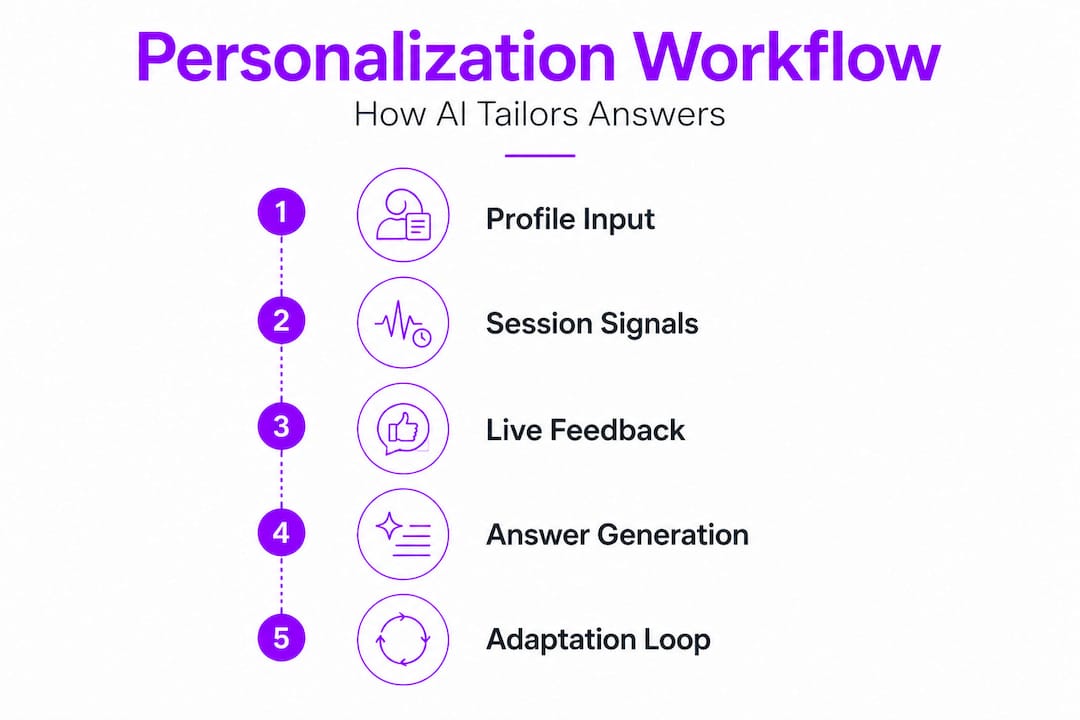
AI interview tools typically build a picture of you through three layers of input. First, there’s your static profile: the resume you upload, your stated job goals, and any background you’ve manually entered. Second, there’s interaction history: patterns the system picks up from your previous sessions, the types of questions you’ve practiced, and how you’ve responded to feedback. Third, there’s live context: the real-time information the system is working with during your current session, like the job description you’ve pasted in or the company name you’ve mentioned.

The system then combines these layers to generate answers it believes will fit your situation. If you’re interviewing for a senior product manager role at a fintech startup, a well-personalized AI should suggest answers that lean into leadership and metrics-driven thinking rather than entry-level operational tasks. That filtering is where the value shows up.
Here’s where it gets complicated. LLM personalization performance is measurable, and even frontier models struggle particularly with incorporating a user’s latest situation into their responses. In other words, even the most advanced AI is better at remembering static facts (like your job title) than it is at understanding that your priorities changed after your last interview. Dynamic updates are harder to process than stored facts.
Here’s a practical breakdown of how the personalization pipeline functions step by step:
- Input collection. You provide your resume, target role, company details, and any specific constraints or preferences.
- Profile construction. The AI builds an internal model of your situation, drawing on what you’ve shared and any session history it has access to.
- Answer generation. For each question or scenario, the system generates a response filtered through your profile.
- Adaptation loop. As you interact more, the AI is supposed to update its model based on your feedback and new information you provide.
- Output delivery. You receive tailored suggestions, ideally calibrated to your goals and context.
The adaptation loop in step four is where most personalization failures occur. If you don’t actively signal that something has changed — a new job priority, a different target company, revised interview feedback — the AI may keep generating answers based on stale assumptions.
For AI-powered interview guidance to actually be powered by your situation, you have to treat each session as a fresh briefing. Start by reminding the system of your current status, not just your general background.
Pro Tip: At the start of every practice session, explicitly state your current goal, your most recent interview result, and any preference changes. This brief habit prevents the system from defaulting to outdated assumptions and keeps the personalization pipeline running on accurate inputs.
Personalization pitfalls: when AI can get it wrong
Now that you know how the process works, it’s crucial to recognize when and why personalization may fail, so you can avoid the most common traps.
Personalization failures in AI interview tools are more common than most candidates realize. Research shows that proactive personalization can result in lower alignment in 42.6% of model-task cases versus generic replies. That’s nearly half of all situations where an AI’s attempt to personalize actually made things worse. Meanwhile, key personalization edge cases include cold-start scenarios, cross-session conflicts, and over-personalization — all of which regularly affect job seekers in practice.
Let’s look at each failure mode clearly:
Cold-start problem. When you’re a new user or haven’t provided enough profile data, the AI has almost nothing to work with. Instead of helping you, it may make sweeping assumptions based on generic patterns, producing advice that feels strangely off-target. Think of it like a career coach who skips your intake meeting and just wings it.
Contradictory data. If you told the system you’re targeting a startup three sessions ago but you’re now applying to enterprise companies, the AI may still be calibrating advice for startup culture. Contradictions across sessions create confusion that the AI rarely resolves without your input.
Over-personalization. This one surprises most people. Sometimes the AI overcorrects — focusing so hard on one aspect of your background that it distorts your answers. For example, if you mentioned a niche technical skill once, the AI might keep pushing it into answers where it simply doesn’t belong.
Here’s a quick comparison that shows when to lean on personalized versus generic AI advice:
| Situation | Use personalized AI | Use generic AI |
|---|---|---|
| Strong, detailed profile provided | ✓ | |
| First session, no history | ✓ | |
| Recent interview feedback added | ✓ | |
| Goals changed since last session | Refresh first | |
| AI can’t recall your profile details | ✓ | |
| Preparing for very specific company | ✓ |
For answer customization for remote interviews to work in your favor, you need to monitor what the AI actually knows. Don’t assume it’s tracking your situation correctly.
Common signs that personalization has gone wrong:
- Answers feel strangely generic despite your detailed profile
- The AI references outdated role preferences you’ve moved past
- Suggested answers don’t match the seniority level you’re targeting
- The system avoids skills you’ve listed prominently
Pro Tip: Ask your AI interview tool to summarize the key facts it knows about you. If it can’t recall your target role, current constraints, or recent goals accurately, switch to generic guidance for that session and rebuild your profile inputs from scratch.
Making the most of AI answer personalization in interview prep
Each pitfall has a practical solution. Here’s how you can take control and customize your AI-powered interview prep for the best results.
Effective personalization is a two-way process. Research consistently points to the importance of treating personalization as a pipeline: provide relevant and specific context, confirm what the AI has stored, and actively prompt for preference adjustment. And because personalization success depends heavily on dynamic user-state tracking, you can’t assume the AI is automatically updated when your situation changes.
Here’s a step-by-step approach that puts you in control:
- Build a detailed starting profile. Include your target role, seniority, industry, preferred companies, key skills, and any recent interview feedback. More specific inputs produce noticeably better outputs.
- Choose your answer format upfront. Tell the AI whether you want STAR-method narratives, bullet-point structures, or concise single-paragraph answers. Format preference is easy to miss but makes a big difference.
- Verify what the AI remembers. Before diving into a session, ask the system to reflect back your current situation. Fix any gaps before you start practicing.
- Refresh after major changes. New company target? Different role level? Recent rejection with specific feedback? Update the AI explicitly. Don’t assume it figured out the shift on its own.
- Test with edge-case questions. Ask the AI something where your specific background should clearly shape the answer. If the response feels generic, your profile data isn’t being used effectively.
Here’s a quick reference table to keep your personalization on track:
| What to update | When to do it | Why it matters |
|---|---|---|
| Target role and company | Every new application cycle | Prevents stale company-fit advice |
| Recent interview feedback | After every real interview | Keeps advice aligned with actual gaps |
| Answer format preference | At session start | Ensures usable output format |
| Skill priorities | When your pitch changes | Avoids over-emphasis on old strengths |
| Constraints (location, timeline) | Whenever they shift | Prevents misaligned logistical suggestions |
Feeling confident during your prep sessions is a byproduct of feeling understood by your tools. Explore confident interview preparation to see how a structured approach to personalization connects directly to performance. You can also look at how mobile apps personalize for broader context on why dynamic user-state management makes or breaks any personalized experience.
Why AI answer personalization is both overrated and underused in interviews
Here’s a perspective that most interview prep guides skip entirely: candidates tend to fall into one of two traps. Either they avoid personalization features entirely because they seem complicated, or they turn personalization on and then go completely passive — assuming the AI will do the heavy lifting. Both approaches underperform.
The candidates who actually benefit from AI in job interviews are the ones who treat it like an active collaboration. They upload a detailed resume, they correct the AI when an answer misses the mark, and they explicitly flag when their situation has changed. They’re not just receivers of AI output. They’re steering it.
Here’s the uncomfortable truth: the feature most candidates find “magic” — the AI that somehow just knows what to say — is also the feature most likely to mislead you when it lacks accurate inputs. Frontier models can still produce outdated, contextually wrong, or subtly misaligned interview answers with complete confidence. You’d never know unless you caught it.
The real advantage of personalization isn’t that it removes your effort. It’s that it focuses your effort. When the pipeline is working — you’ve provided current context, the AI is referencing your actual background, and you’re correcting it in real time — your practice sessions become dramatically more targeted. You stop rehearsing answers that don’t apply to your situation, and you start building the specific communication muscles the role actually demands.
The candidates who see the biggest gains are trial-and-error users. They test the AI’s suggestions against their real interview experiences, adjust their inputs based on what worked and what didn’t, and gradually build a sharper, more accurate personalization profile over time. That feedback loop, not the AI itself, is what produces results.
Get smarter interview support with AI-powered tools
Knowing the limits and the potential of AI answer personalization, your next move is finding tools that let you put these strategies into practice — not just in theory but in real interviews.

MeetAssist is built specifically for candidates who want to apply this kind of active, hands-on approach. You can upload your resume for personalized responses, choose from multiple AI models including GPT-4.1 and Claude, and switch between answer styles like STAR method, bullet points, concise, or detailed on the fly. Explore AI interview assistant alternatives to see how MeetAssist compares, or visit the MeetAssist how-to guides to get a step-by-step walkthrough of setting up your profile for maximum personalization accuracy. In Phone Mode, everything runs on your device, invisible on screen, with no audio or video recorded.
Frequently asked questions
Can AI answer personalization hurt my interview performance?
Yes — if the AI guesses your preferences incorrectly or lacks context, it can actually give less helpful answers than a generic approach would have, especially when your profile data is incomplete or outdated.
How accurate is AI answer personalization in interviews?
Even cutting-edge models have measurable limits, and frontier models struggle most when it comes to factoring in your latest interview situation rather than static background facts.
What should I do if AI answers feel generic?
Give the AI specific details about your role, the company, and your current constraints, then ask it to confirm what it knows before generating new answers — this resets the personalization pipeline and produces sharper, more relevant output.
When is generic AI assistance better than personalized?
When you haven’t provided recent or accurate information, sticking with standard guidance prevents misalignment and stops the AI from over-correcting based on incomplete or stale context — a scenario that affects nearly half of personalization attempts.
Recommended
- AI Interview Prep in 2026: Boost Confidence by 35% – MeetAssist | MeetAssist
- AI-driven assessment explained: Prep smarter for technical interviews | MeetAssist
- AI-powered interview guidance: confidence boost for 2026 – MeetAssist | MeetAssist
- AI interview assistance: boost job success in 2026 – MeetAssist | MeetAssist
- Priročnik za personalizacijo ponudb s pomočjo AI (2026) - ChatTrips