The key to growing a Chrome extension: make sure users realize value, make it more reliable, get it ranked better and add better analytics. MeetAssist went from $29/month to $993/month. The best growth channel for products is product quality.
This case study comes from building MeetAssist, an AI interview assistant Chrome extension used in online technical and behavioral interviews. At the time of writing, the product had about 5,000 registered users, 232 paying users, 27,000+ meetings processed, 148,000+ transcriptions generated, 91,500 Google impressions, and 4,860 Google clicks.
Onboarding should show value, not explain features. Users need the “this works” moment in a few clicks.
SEO can become a primary acquisition channel. Google and the Chrome Web Store drove most new users.
Infrastructure affects conversion. Latency and reliability matter more when your extension works in real time.
Telemetry reveals what users cannot describe. Detailed session data made support and product fixes faster.
1. Make product quality your first growth lever
The key takeaway from MeetAssist is that product wins over marketing. There’s a clear link between quality improvements, e.g. speed, answer quality, reliability, and visual, and a willingness to pay.
For a Chrome extension, it all boils down to user perception. They install it, use it once, and think “it’s helpful” or “it’s flaky” based on first impressions. If the extension is slow, buggy, confusing, and ugly, no amount of fancy marketing can convince users to stick around.
What improved conversions
Faster AI response generation
More relevant answers based on the user’s resume, skills, position and job description
Better screenshots and Chrome Web Store visuals
Fewer connection failures during meetings
More stable real-time transcription and WebSocket behavior
Speed is also central to MeetAssist’s value proposition. MeetAssist watches interview questions in real time and offers answers in an easily digestible format, and if a user has to wait too long for their answers to display, the product’s appeal will be lost. If the speed of your app is part of its offering, then speed is user experience, not a “mere” technical detail.
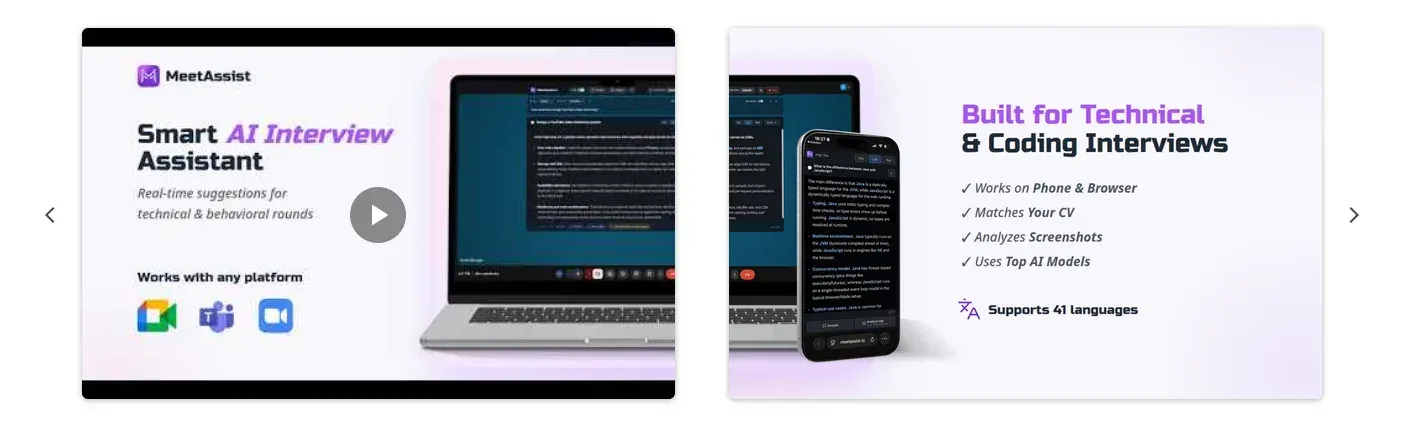
MeetAssist chrome store image
2. Shorten the path to the first “wow” moment
One of the major improvements was reducing how long it takes for the value to kick in. The earlier builds had users take too many steps before understanding what MeetAssist was for.
With the flow distilled, a user could install the extension and see it running in an actual meeting in mere clicks. This changed the onboarding goal from explaining the product to allowing the user to feel its value.
How to apply this to your own extension
Identify the core value moment. For MeetAssist, it was seeing real-time interview question detection and answer suggestions.
Remove optional setup before that moment. Ask only for what is needed to demonstrate value.
Use defaults wisely. Let users customize later, after they trust the product.
Test the first session like a new user. Install from scratch and count every click before value appears.
If your extension requires access to profile data, permissions, or settings, try to defer them if possible. A user who has already seen the value is more likely to go through with configuration.
3. Build SEO around real search behavior
SEO emerged as MeetAssist’s top acquisition source, driving in many new users through Google and the Chrome Web Store thanks to a combination of backlinks, site authority optimization, and content efforts.
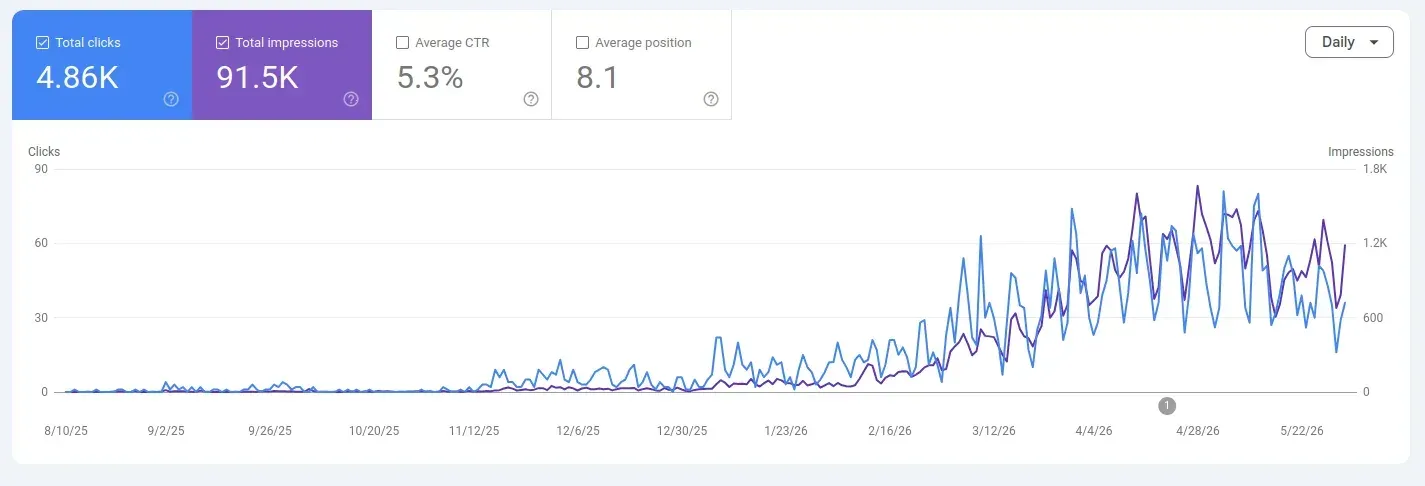
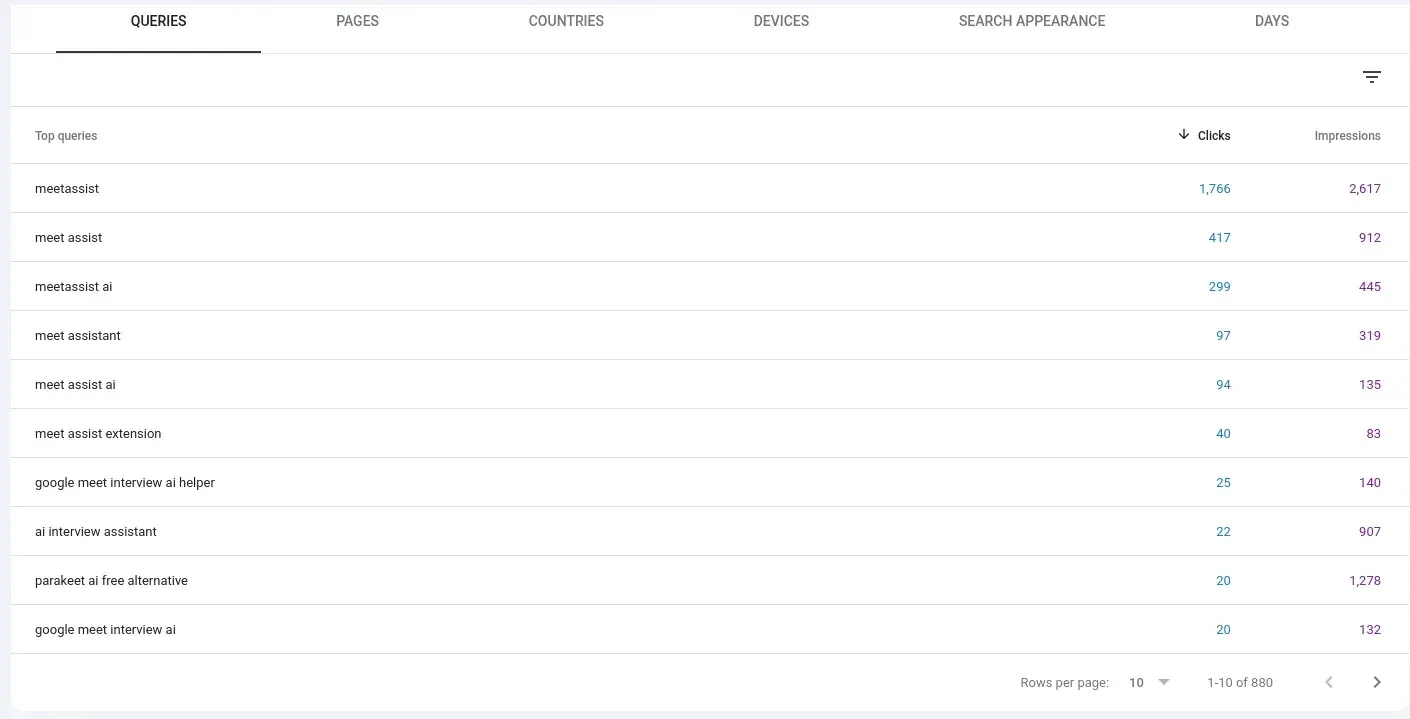
The data revealed compelling search demand: 91,500 Google impressions and 4,860 clicks. This is significant because Chrome extensions frequently operate within narrow yet highly targeted search segments. When someone actively searches for an AI-powered interview coach, coding interview prep, or live interview assistance, they’re already in a problem-aware state.
Google search console performance
What worked for SEO
Creating a large amount of relevant content
Spending roughly $400 on backlinks
Improving domain authority over time
Making the most of both search and Chrome Web Store discovery
An additional, odd finding was that removing many AI-generated pages that were not appearing in Google’s index saw organic traffic decline ~50%. The reason was unclear but the lesson holds up: be careful when bulk-removing content. Pages may be unimportant, non-indexed, and have little value on the surface, but may contribute to interlinking, crawling flow, topical depth, etc.
Google search console keywords
4. Treat infrastructure as part of the product
Infrastructure was crucial, since MeetAssist is global and real-time. MeetAssist was initially developed using Cloudflare Workers, however, the nature of the product (which entails a lot of WebSocket and real-time) demanded a level of reliability that Cloudflare Workers could not yet support.
Subsequently, the backend was moved to AWS with servers distributed over Europe, the US and Asia in geo-based routing. With lower latency and better reliability, support ticket counts decreased and conversion rates improved.
When infrastructure becomes a growth issue
Growth is contingent on infrastructure in situations where your extension relies on:
Real-time audio, transcript, or meeting data
WebSocket connections
Fast AI responses
Global users in different regions
Low tolerance for failure during important moments
An unreliable connection during an AI-driven interview isn’t a minor glitch; it’s a trustbreaker. To solve this, MeetAssist leverages distributed infrastructure with multi-region routing, ensuring rapid, stable answer delivery for applicants in high-stakes interview preparation and communications scenarios.
5. Use telemetry to find the real bottlenecks
Telemetry became the secret sauce. Sure, customer feedback was fine, but only telemetry revealed precisely what customers were doing.
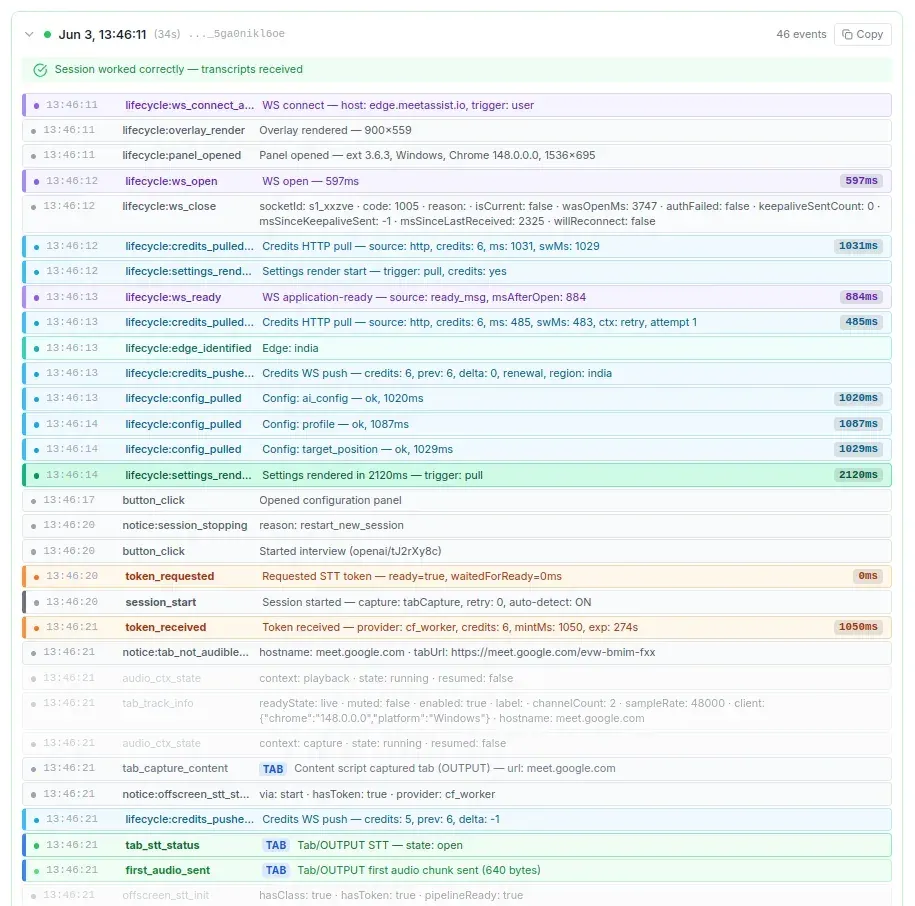
For example, MeetAssist was logging information like when the WebSocket was connected, when the AI gave the answer, speech-to-text performance, backend errors, how long it took to generate tokens, regions routed for each user, and how long requests took. When a user would say something was wrong, it often took us just a few seconds to find out what was happening.
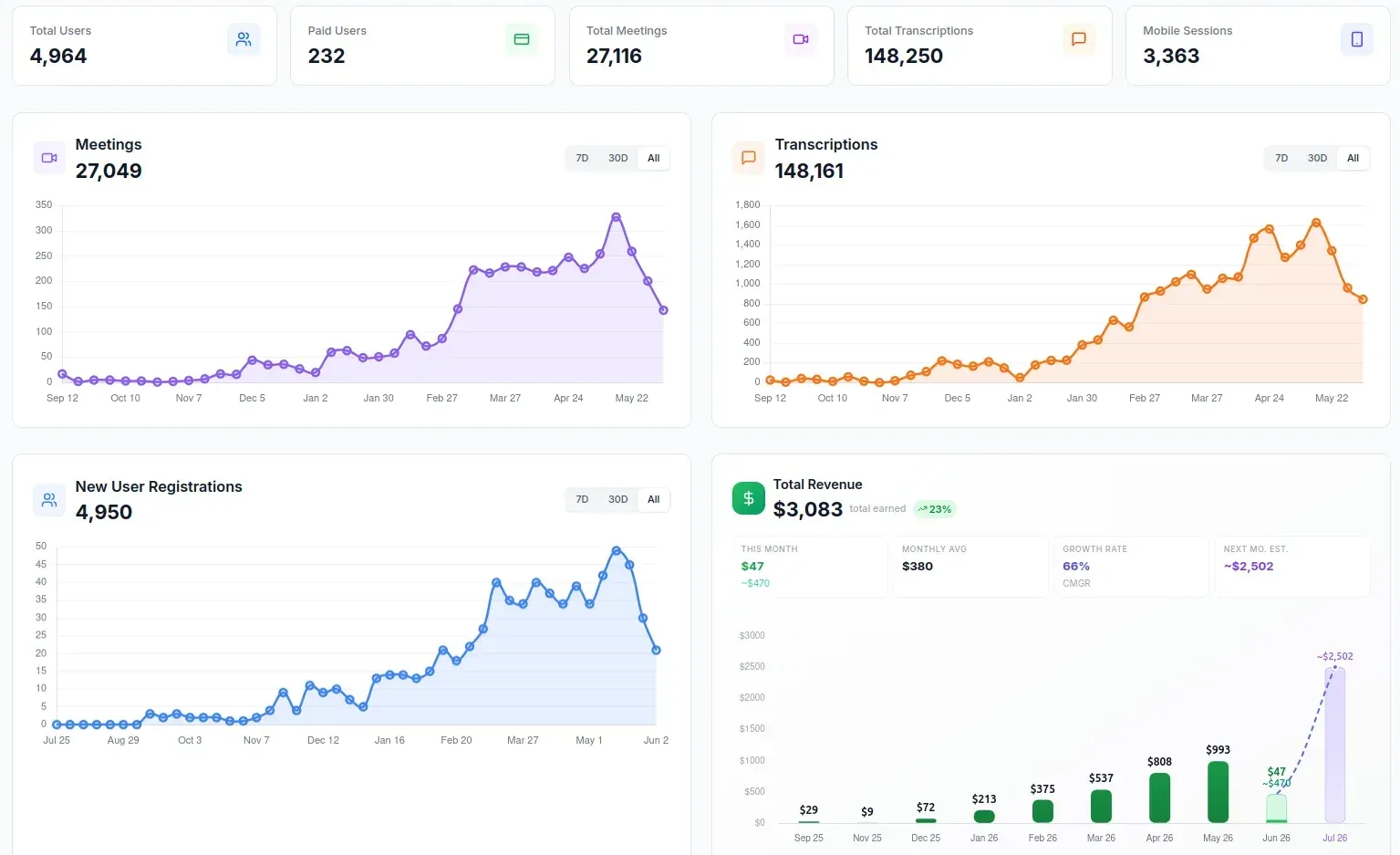
MeetAssist telemetry
Useful telemetry for Chrome extensions
Extension install and activation events
Time to first successful action
API latency by region
Authentication and permission errors
Connection failures and reconnect attempts
Feature usage by session type
Payment funnel drop-offs
However, often the best insights came from telemetry, not the feedback itself. We wouldn’t know what to do if they just said “it didn’t work.” But with the right telemetry, we would know whether the failure was in permissions, or in the transcription itself, or the routing of calls, or model latency, or a frontend state bug.
What this means if you are building a Chrome extension
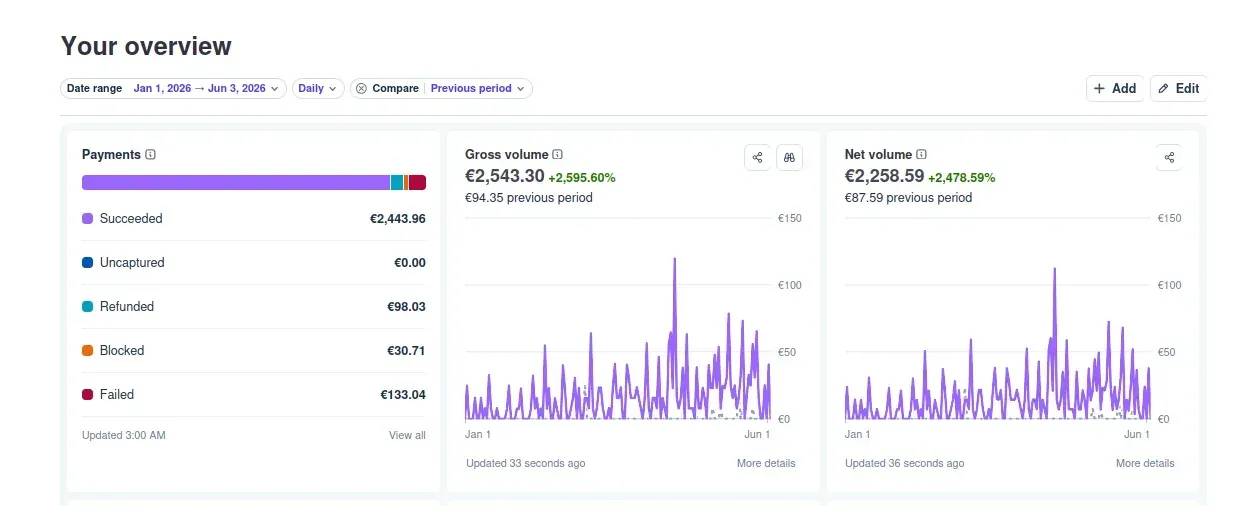
$29/month turned into $993/month, and it wasn’t one big launch. Instead it was incremental compounding: faster onboarding, better product, better SEO, more resilient infrastructure, and better debugging.
If you are writing your own extension, start with this checklist:
Is it possible for new users to realize value in a handful of clicks?
Does your Chrome Web Store listing convey the benefits clearly and visually?
Is your content aiming for search queries with actual intent?
Do you identify the exact location within the product where your users fail?
Can your infrastructure keep working for your top use case?
For MeetAssist, that use case is helping candidates prepare, stay calm, and structure answers during interviews. If you want to try how the extension works in practice, you can visit MeetAssist or view it in the Chrome Web Store.
Stripe with Gross Volume
Frequently asked questions
How do you grow a Chrome extension from zero?
Make your core use case work reliably, cut the onboarding friction to deliver value early, and then build a suite of activities to optimize Chrome Web Store and SEO content, get backlinks, and understand where and why people churn with telemetry.
Is SEO useful for Chrome extension growth?
When your extension is the solution to a problem people actively search for, then you're in luck because SEO can be one of your best growth channels. In MeetAssist's case, that's exactly what we relied on, and SEO proved to be a primary acquisition channel for us from both Google and the Chrome Web Store.
What metrics should a Chrome extension track?
Measure activation rate, time to value, feature usage, connectivity failures, API latencies, regional differences, support-inciting bugs, and payment conversion rates. For real-time products, latency and reliability numbers are key.
Does infrastructure really affect Chrome extension revenue?
It definitely can. Your extension could depend on real-time, AI-powered conversations or use WebSockets. If that infrastructure is slow or flaky, you could see less trust and less conversion. On the flip side, you might get better latency and more reliability, and that might mean better retention and sales.
What made MeetAssist grow?
It all started with product quality, faster onboarding, SEO, global infrastructure improvements, and detailed telemetry which helped meetAssist increase revenue from $29/month to $993/month.


 MeetAssist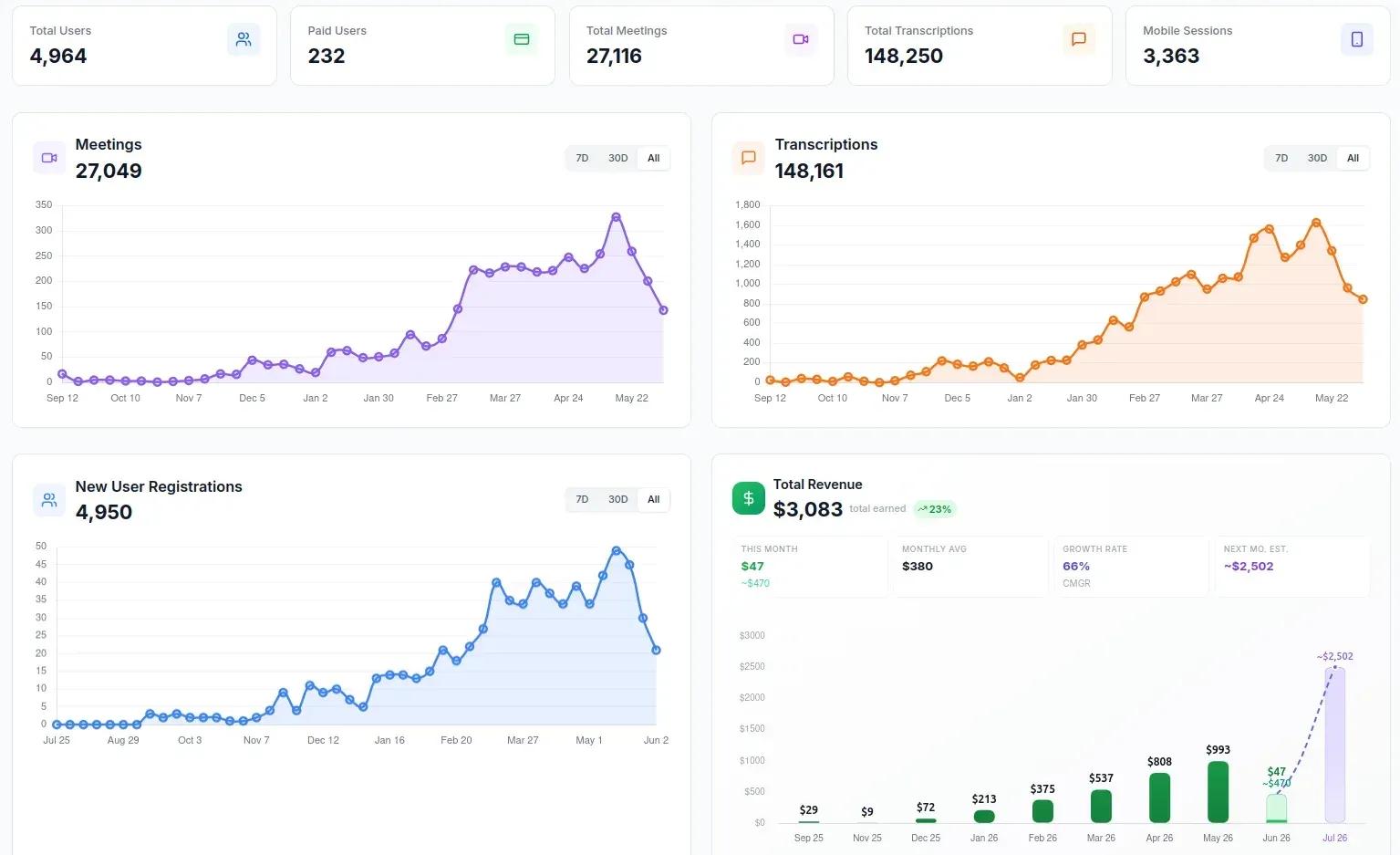
 Or add the Chrome extension